How to Choose the Best IP PoE Intercom System?
Choosing the best IP PoE intercom system starts with understanding how people will use it every day. A small office may need clear visitor calls and reliable door release. A larger property may require several entry points, indoor monitors, and centralized management. The right choice depends on the site, not just the feature list.
PoE can carry power and data through one Ethernet cable, which may simplify installation. Still, check that your network equipment can support the system’s power needs and expected traffic. Confirm compatibility with existing cameras, access control, and management software before buying. A system that looks impressive in a product photo may not fit your actual setup.
Pay close attention to audio clarity, camera performance in changing light, and weather protection for outdoor units. Ask how the system handles user permissions, software updates, and support after installation. These details matter when a device becomes part of a building’s daily routine. Small details count.
The phrase Interphone Ip Poe may appear across product searches, but terminology alone does not prove quality. Compare specifications from manufacturers, review installation requirements, and seek advice from a qualified installer when network conditions are unclear. If possible, test a sample unit in realistic lighting and noise. That can reveal issues a brochure cannot.
There is no perfect system for every property. A practical comparison should balance reliability, compatibility, ease of use, and long-term support against budget. Some trade-offs are unavoidable, and it is worth stating them plainly. This guide explores the questions that help narrow the options and choose a system that suits real operating needs.
Define Entry, User, and Access-Control Requirements Before Comparing Models
How to Choose the Best IP PoE Intercom System?
Define Entry, User, and Access-Control Requirements Before Comparing Models
Start with the doors people actually use. A single entrance to a small office has different needs from a residential lobby with a service door and side gate. Note each entry point, its exposure to weather, and whether visitors can approach it safely. Measure the cable route, too; a long or awkward run may affect installation planning even when PoE simplifies power and data connections.
Then count users and consider how they will answer calls. A household may rely on one indoor monitor, while a busy reception area may need several staff members to respond from different locations. Be specific about daily routines: delivery access, after-hours visitors, and calls that should reach a mobile device. Keep the list realistic. It is easy to overestimate how many features people will use.
Access control needs a separate check. Decide whether visitors should only speak with someone, or whether authorized staff also need a way to release the door remotely. Identify the existing lock, door-release hardware, and any required credentials before comparing systems. These details can reveal compatibility issues early. Small details matter. A clear needs list makes model comparisons more useful than a long feature checklist, though the first draft will probably miss something. Revisit it with the people who answer the intercom and manage the doors.
Verify SIP, ONVIF, and Relay Compatibility With Existing Equipment
Choosing the best IP PoE intercom system starts with the equipment already installed. SIP support can enable calls to compatible phones or software, but matching protocol names alone is not enough. Check supported SIP versions, audio codecs, registration settings, and call-routing options. A device may register successfully yet still fail to deliver two-way audio. Test a call before purchase, if possible.
ONVIF can help an intercom work with a video recorder or other security equipment. Confirm the exact ONVIF profile and functions supported on both devices. Live video may work while events or access-control features do not. It is easy to assume “ONVIF compatible” means everything connects. That assumption deserves a closer look.
Tips: Ask for the intercom’s SIP and ONVIF specifications. Test a call, video stream, and event notification with your actual equipment.
Check the relay before connecting a door strike or other access device. Verify whether its contacts are normally open or normally closed, and compare voltage and current ratings with the load. Many relays provide a dry contact, so the lock may need a separate power supply. Confirm the wiring diagram and test the release function safely. Keep notes; small configuration details are easy to miss.
Match PoE Capacity: IEEE 802.3af Provides 15.4 W; 802.3at Provides 30 W
When choosing an IP PoE intercom, match its power requirement to the switch port, not just the product label. IEEE 802.3af supplies up to 15.4 W at the switch, with about 12.95 W available to the device after cable losses. IEEE 802.3at supplies up to 30 W, with about 25.5 W available at the device. That difference matters when an intercom has a bright display, camera illumination, or a built-in heater. Check the device’s maximum draw, especially during startup or in cold weather. Small details count.
Also check the switch’s total PoE budget. A switch may offer 30 W per port but lack enough shared power for every connected intercom at once. Long or poor-quality cable runs can further reduce available power. Confirm that both the switch and intercom support the same PoE standard; a higher-rated port does not make a non-compliant device draw more power. Door strikes may require a separate supply, so verify their power needs independently. It is easy to overlook that point when comparing intercom specifications. A practical test under normal operating conditions can expose a marginal setup before installation is complete.
Check Network Layout: Standard Copper Ethernet Channels Support Up to 100 m
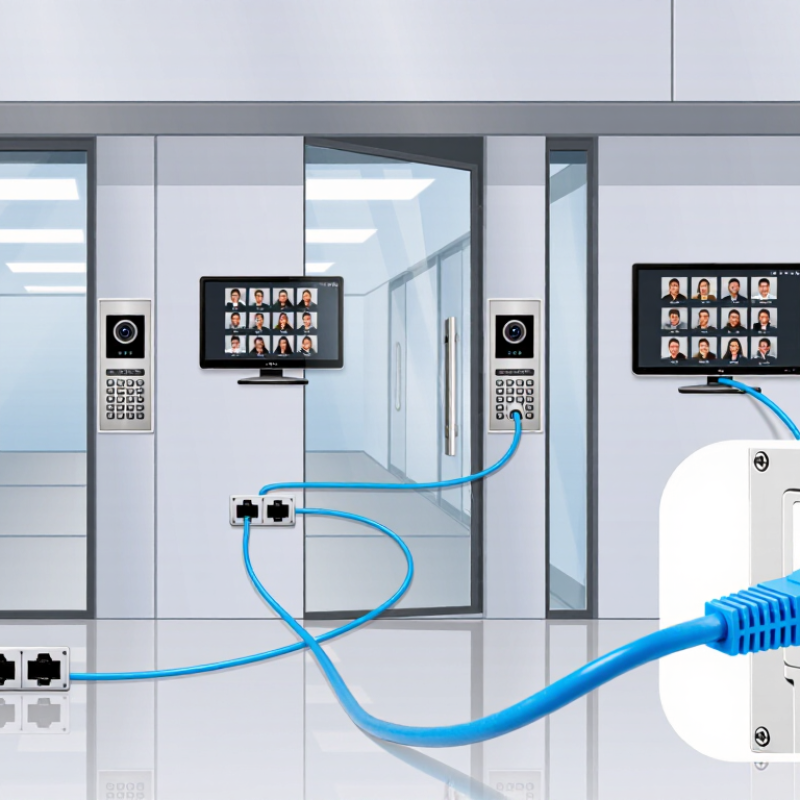
An IP PoE intercom depends on both data connectivity and power delivery, so plan cable routes before choosing equipment. IEEE 802.3 specifications set a 100 m limit for standard twisted-pair Ethernet channels. ANSI/TIA-568 structured-cabling guidance divides this into up to 90 m of fixed cable and 10 m of patch cords. Distance matters. A gate 85 m from the network cabinet may appear within range, but extra patch leads can push the channel beyond its limit. PoE voltage drop, warm cable bundles, and poor terminations can also affect reliability. That 100 m figure is a limit, not a promise.
Tips: Measure the complete route, including patch cords. Leave a small service loop, but count it in the total length. Test the finished channel with a cable tester, not just a link light.
For a long driveway or remote entrance, sketch the path and note bends, outdoor sections, and cabinet locations. A clean plan can still miss a few metres. If the measured channel exceeds 100 m, consider a properly designed intermediate network point or fiber link with a local PoE source. Verify the intercom’s power requirements and the cable test results at the installed location before handover.
Compare Audio, Video, Weather Ratings, and Security-Update Policies
How to Choose the Best IP PoE Intercom System?
Compare audio and video under the conditions where the intercom will actually be used. A visitor’s voice should remain clear beside traffic, a fan, or a busy entryway. Test it at dusk. Check whether the camera captures faces against bright backlighting, not just a sharp image on a product page. Listen from outside. Echo and weak speech can make a capable system frustrating.
Weather ratings deserve a close read. Match the enclosure’s published rating to rain, dust, and temperature exposure at your mounting location; a sheltered porch differs from an uncovered gate. Installation details matter too. Cable entry points and seals can affect real-world protection. For security, look for a clear policy on firmware updates, including how updates are delivered, how long support is expected, and who can change system settings. A vague promise of “ongoing updates” is hard to assess. It may be enough for some sites, but I would want more detail.
Tips: Test audio with the door closed and open, then review video at night. Ask the supplier for the update-support period in writing. Record the unit’s model and firmware version after setup; it is a small step, and easy to forget.