2026 How to Choose a Smart Wireless HD WiFi Camera Doorbell
Choosing a Smart Wireless Hd Camera Wifi Video Doorbell in 2026 requires more than checking video resolution. The best model should fit your entrance, network, habits, and privacy expectations. A clear image matters, but so do stable WiFi performance, fast alerts, night vision, and two-way audio. Imagine a delivery arriving at 9:40 p.m., under weak porch lighting. The camera should still show the visitor’s face and package clearly.
Jamie Siminoff, founder of Ring, said, “The front door is the most important part of your home.” That idea remains useful when comparing modern doorbells. Look for dual-band WiFi, local storage options, encrypted cloud services, and a battery that survives seasonal temperature changes. Wired models may offer steadier operation, while battery models suit renters and older homes. Check installation carefully. A thick wall, metal door frame, or distant router can reduce reliability.
Avoid choosing from specifications alone. A 4K sensor may consume more bandwidth, and a wide viewing angle can distort faces near the edge. I have found that app response often matters more than impressive packaging. Still, personal testing is imperfect. Weather, router placement, and household traffic can change results. Read independent reviews, confirm subscription costs, and examine the manufacturer’s update history. A trustworthy Smart Wireless Hd Camera Wifi Video Doorbell should provide useful evidence, not unnecessary surveillance. It should protect your entryway while respecting everyone who approaches it.
Understanding Smart Wireless HD WiFi Camera Doorbell Technology
Understanding Smart Wireless HD WiFi Camera Doorbell Technology
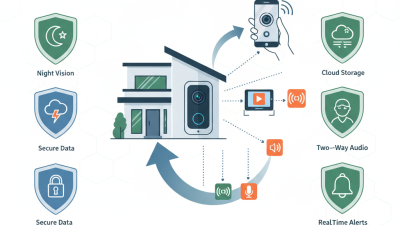
A smart wireless HD WiFi camera doorbell combines a camera, microphone, motion sensor, battery, and cloud connection. Its image quality depends on more than resolution. A 2K sensor may show faces clearly, but weak WiFi can create delays or broken video. The 2.4 GHz band usually travels farther through walls. The 5 GHz band often provides faster video nearby. According to the Wi-Fi Alliance, Wi-Fi 6 can deliver higher capacity and lower latency in crowded networks. That helps when several phones, cameras, and smart devices share one router.
Industry forecasts also show steady demand. Grand View Research estimated the global smart doorbell market at about USD 2.1 billion in 2023, with strong growth expected through 2030. However, market forecasts differ by research method. I would not treat one percentage as certainty. Battery life, night vision, HDR performance, and local storage deserve closer attention. A clear evening image is useful, but a reliable alert matters more. Motion zones can reduce false notifications from trees, headlights, and passing pets.
Tips: Test the WiFi signal beside the entrance before installation. Stand several steps away and check facial detail. Ask whether the device supports encrypted communication, two-factor authentication, and firmware updates. Cloud storage may add recurring costs. Local storage can improve control, but a stolen device may take its recordings with it. Doorbell technology is convenient, not perfect. Expect occasional delays.
How to Choose a Smart Wireless HD WiFi Camera Doorbell
Video resolution affects image detail and storage requirements. The chart compares common video formats by their approximate total pixel count, calculated from standard frame dimensions.
Higher resolution can improve facial and package detail, but it also requires more bandwidth, processing power, and storage. For many wireless doorbell installations, 1080p or 1440p provides a practical balance between clarity and network efficiency.
Assessing Video Quality, Wireless Connectivity, and Power Options
Choosing a smart wireless HD WiFi camera doorbell starts with image quality, not box resolution. A 1080p sensor may still produce muddy faces under a bright porch lamp. Look for HDR, wide dynamic range, infrared detail, and a tested vertical viewing angle. The Annual Internet Report forecast video could reach 82% of consumer internet traffic by 2022, making efficient compression important. I inspect a visitor’s face at the gate, not leaves across the street. That test exposed my mistake.
Wireless performance depends on distance, walls, interference, and upload speed. ITU Facts and Figures 2024 estimates that 5.5 billion people were online, equal to 68% of the global population. More connected homes also mean busier wireless environments. Use 2.4GHz for range, but consider dual-band support near crowded apartments. Check live-view delay, reconnection behavior, WPA3 support, and local recording. Signal bars can mislead.
Power options change reliability. Wired models can support continuous recording, while battery units simplify mounting and handle brief outages. Check battery capacity, charging time, cold-weather performance, and event-recording limits. Solar assistance sounds useful, but shaded porches may provide little charge. I would measure sunlight for a week before trusting it. Also, review standby consumption and charging safety against recognized electrical guidance, not only the seller’s runtime estimate.
Comparing Essential Security, Privacy, and Smart Home Features
Choosing a smart wireless HD WiFi camera doorbell in 2026 requires more than a high pixel count. In a practical setup, 2.4 GHz often reaches distant porches better, while 5 GHz provides smoother nearby viewing. Test faces at three meters, especially against sunlight, rain, and moving visitors. HDR, infrared night vision, a wide viewing angle, and motion zones matter more than impressive packaging. Battery life also changes in cold weather. Small detail, big frustration.
Privacy should guide the comparison. NISTIR 8259 recommends unique credentials, secure updates, and data minimization for IoT products. The 2024 Verizon Data Breach Investigations Report recorded a 180% increase in vulnerability exploitation as an initial access method. That figure does not describe doorbells specifically, but it deserves attention. Select encrypted connections, two-factor authentication, update notifications, and adjustable video retention. Local storage can reduce cloud exposure, though stolen cards remain a concern. No option is perfect.
Smart home compatibility adds useful control, but convenience can widen access. Look for activity zones, microphone controls, guest permissions, and clear deletion tools. Support for common automation standards can connect alerts with lights or indoor displays without excessive app switching. The 2024 IBM Cost of a Data Breach Report estimated the global average breach cost at 4.88 million dollars; this is not a doorbell estimate, but careless data handling still carries consequences. I might overvalue image sharpness. A secure, reliable alert is usually more valuable.
Choosing the Right Doorbell Camera for Your Property and Budget
Choosing the Right Doorbell Camera for Your Property and Budget
A smart wireless HD WiFi camera doorbell should match your property, not merely your wish list. Parks Associates’ 2024 consumer research reported video-doorbell ownership in roughly one-third of U.S. internet households. That growth makes careful comparison more important. Measure the entrance first. A narrow hallway may need a wide viewing angle. A driveway needs stronger night vision and longer detection range. For most homes, 1080p provides usable identification. Higher resolution helps, but only with stable WiFi and adequate storage.
Budget beyond the purchase price. Check subscription fees, replacement batteries, cloud storage, and installation time. A lower-cost model may become expensive after three years. Local storage can reduce recurring costs, but it requires maintenance and secure physical placement.
I once overvalued resolution and ignored battery access. That was a practical mistake. Convenience matters.
Security deserves equal attention. NIST’s Cybersecurity Framework 2.0 recommends access control, software updates, and ongoing risk management. Choose a camera with multi-factor authentication, encrypted transmission, clear privacy controls, and automatic firmware updates. Test the wireless signal at the door, not beside the router. Thick walls can weaken performance quickly. A 2024 survey from the International Data Corporation also found that reliability and security remain major smart-home adoption concerns. Do not assume every advertised feature works equally well in rain, darkness, or crowded wireless environments. Test before committing.
Installing, Configuring, and Maintaining a WiFi Camera Doorbell
Installing a smart wireless HD WiFi camera doorbell requires more than drilling two holes. Check the WiFi signal beside the entrance before mounting it. Thick walls can weaken video quality and delay alerts. Keep the camera about 1.4 meters above the ground. This height usually captures faces clearly without showing too much sky. Tighten every screw, but avoid cracking the mounting plate. Seal exposed gaps against rain and dust. I once ignored a loose bracket, and the camera slowly tilted after several windy days.
During configuration, connect the doorbell through a secure home network. Create a unique password and enable multi-factor authentication when available. Update the firmware before adjusting detection settings. Set motion zones toward the walkway, not the entire street. Lower sensitivity if passing cars trigger constant alerts. Check the time zone, night vision, microphone, and two-way audio. Test the live view from another room. It should respond quickly. Some settings are confusing, so read the instructions twice instead of guessing.
Maintenance should be simple but regular. Wipe the lens with a soft, dry cloth every few weeks. Inspect the battery level, screws, weather seal, and charging contacts. Test the doorbell after router changes or power interruptions. Save important recordings only when necessary, and review storage permissions carefully. A strong signal can still fail during network congestion. Keep a spare charging cable nearby. Small oversights matter.